


What this guide establishes
A multi-currency wallet can handle transfers without being listed by a particular casino. MoneyGO's own tariff and transfer details are therefore only one part of the payment story. Whether an account can send or receive funds through it must be established from the operator's cashier separately.
The Reserve Bank of Malawi's payment-systems resources include the Payment Systems Act, electronic-money regulations and rules on interoperability. These materials concern the movement of funds, not the gaming licence of a merchant. MAGLA separately regulates gaming. A wallet provider's service can be available in Malawi while a supposed game merchant remains unverified; do not interpret a payment icon as authorisation.
Reserve Bank of Malawi payment-systems regulations · RBM currency information
How the MoneyGO process operates
The MoneyGO payment guide provides detailed information on this page, including payment instructions, fees, currency conversion rates, and recipient details.
MoneyGO currencies and game balance
MoneyGO publishes support for USD and more than 30 local currencies, with RUB, UZS and TRY among its examples. For this site's covered markets, the account may display INR, BDT, PKR, KES, NGN, CAD or GBP, subject to the operator's permitted storefront and region. A wallet service's support for a denomination does not itself demonstrate that a particular casino accepts MoneyGO in that currency.
Compare three denominations: that of the wallet, that of the actual transfer and that of the credited casino balance. If any differ, the displayed conversion and final amount debited determine the payment cost. Read the final credited amount on the actual payment confirmation rather than inferring it from the name of the wallet.
The process of making a money deposit at a casino with MoneyGO.
- Step 1Open the cashier
Select MoneyGO as a deposit amount and the corresponding currency. Ensure that the minimum and maximum transaction amount available is accurate.
- Step 2Enter the amount
Compare the credit to the game balance, and the amount debited from your wallet. The account must be used for currency exchange and any separate outgoing fees.
- Step 3Confirm payment
Check the receiving party and purpose in the service interface. Use only your own wallet.
What is the process of withdrawing from a casino to MoneyGO?
Only when the payment form specifies MoneyGO as the destination for withdrawals. Match the wallet and account holder, verify the receiving currency and retain both transaction IDs.
- Step 1Ensure the amount is available
Bet and then check the main balance. The bonus balance may have different restrictions.
- Step 2Choose your own wallet
Match the details to the account owner and the conditions of the original deposit.
- Step 3Check the final payout
Clearly state the minimum amount, charge, and currency of payment in the request. Don't impose a USD fee on an account in a different currency.
- Step 4Track the crediting
The first step is to review the withdrawal status in the casino and then your MoneyGO activity history. In case of delay, keep both transaction IDs.
MoneyGO fees: USD and other currencies
The official MoneyGO page features a table that outlines the charges for users, with each casino, exchange, or bank separately listing their own charges.
| Operation | USD | Other currencies |
|---|---|---|
| Incoming transfer | 0% | 0% |
| Outgoing transfer | The balance is 0.50% if verified and 1.90% if not. | 0% according to the published table |
| eVoucher redemption | 0% | Read the applicable terms of the chosen product |
| eVoucher issuance | 1.90% | Read the applicable terms of the chosen product |
As an illustration, 0.50% of a $100 outgoing transfer is $0.50, while 1.90% is $1.90, before any other costs. If the currency is converted along the way, comparing percentages alone is not enough — compare the final credited amount.
MoneyGO: payment stalled or the amount differs
| Problem | Check | Next step |
|---|---|---|
| The money that was sent to the casino is not displayed on the display. | Transaction ID, amount, currency and time | Pass the data to casino support |
| Casino withdrawal pending | Profile, bonus and payment details | Clarify the processing stage |
| Received less than expected | Fee and exchange rate | Compare the receipt with the confirmed outcome |
Ensure that a second payment is confirmed only after the first has been credited. Don't provide your password or one-time codes to the casino or anyone claiming to be a MoneyGO employee.
When to choose MoneyGO
Suitable
The wallet is already opened in the needed currency, the casino accepts MoneyGO in both directions, and the total costs are clear before confirming.
The wallet tariff is not a casino withdrawal tariff
MoneyGO publishes wallet fees for different currencies, while an operator decides which methods appear in its cashier. A fee quoted in USD should not be applied unchanged to another currency or treated as the complete cost of withdrawing a casino balance. Identify the wallet transaction, conversion if applicable, and operator payout separately before calculating a net amount.
Four separate stages in a MoneyGO payment
These stages explain where delays and costs can arise; they are not a recommendation to transfer money.
- Check supportFind MoneyGO separately in the deposit and withdrawal tabs for the actual account and country.
- Match detailsRead the receiving details, currency, network or reference requirements where relevant.
- Read chargesCompare the payment provider charge with the amount that will reach the account.
- Track completionSeparate payment-service confirmation, casino balance credit and operator payout approval.
Transfer-cost worksheet
Estimate the net transfer using fees you enter from the payment screen. All figures are hypothetical units in the same currency.
Net = amount − fixed fee − amount × rate / 100. Actual rates, minimums and supported directions come from the operator and payment service.
MoneyGO: questions and answers
Is MoneyGO automatically available for casino withdrawals?
A wallet account does not create a casino payment method. The payment information for deposits and withdrawals must be listed separately in the payment form.
Which currencies does MoneyGO support?
The cited service materials describe USD plus over 30 local currencies including RUB, UZS and TRY. Possible options in the India, Bangladesh, Pakistan, Kenya, Nigeria, Canada and UK account contexts include INR, BDT, PKR, KES, NGN, CAD and GBP, but only the specific profile confirms its available currency and payment route.
Is the MoneyGO fee always 0.5%?
The table indicates that outgoing USD transfers have 0.50% verification and 1.90% without it; 0% is indicated for other currencies; exchange and third-party charges are separate.
Is it possible to withdraw without document verification?
MoneyGO and the casino each apply their own verification procedures. Having a wallet does not exempt you from the operator's KYC checks.
What is the procedure to install MoneyGO on mobile?
The installation is available on the official service website. Do not download the client through a link from an unsolicited message.
Sources for MoneyGO conditions
Sources: MoneyGO currencies and user-fee table, accessed 9 September 2026. The Russia-selected 1xSlots cashier captured on 8 September 2026 is used only as a foreign interface example.
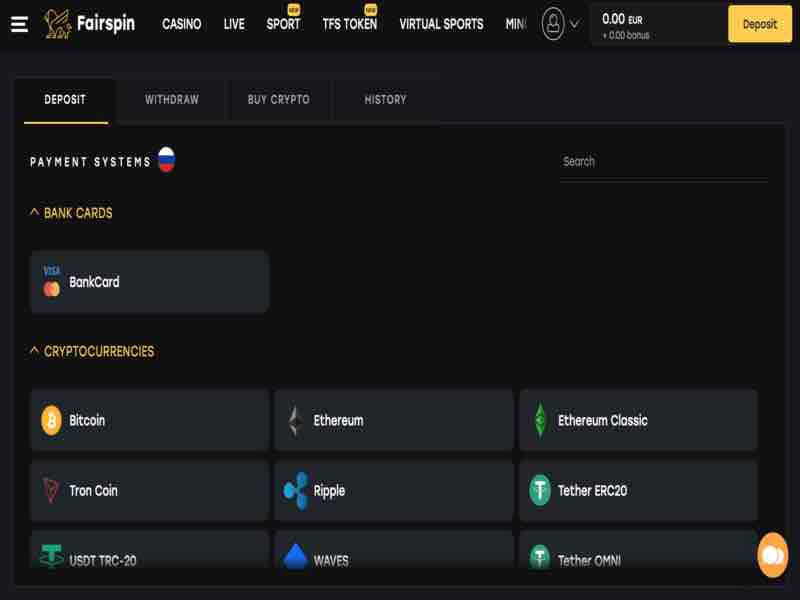
Interface screenshots
Observe the image to comprehend the control elements and payment forms. The sums outlined correspond to the operations that are shown.
MoneyGO and Aviator illustrations
 Illustration: Play Aviator at an online casino with MoneyGo
 Illustration: MoneyGo advantages for Aviator betting
 Illustration: Top up Aviator deposit with MoneyGo
 Illustration: Withdraw Aviator winnings to MoneyGo wallet
Editorial responsibility and source method
 Verifies payment methods
Evgeny Vodolazkin
Author and project analystThe author of the materials on crash games and casino conditions is Evgeny Vodolazkin, and on this page, they compare product rules, payment terms, and interface screenshots. The amounts are based on the specific version and currency.
The operator's terms, game rules, and payment service materials are examined separately, and withdrawal rules are not based on deposit acceptance data.
View the detailed guide
Unlike MoneyGo, acceptance is documented at a verified operator.
It appears in 1win's payment map for Kazakhstan — MoneyGo is not there.
8 Latin American currencies for deposit are confirmed at 1win.
The same operator whose payment documentation we checked on MoneyGo.
How to ensure the multiplier has not been tampered with — with your own hands.
The cashier's rapid movements do not justify playing more frequently.